

Hello, I have a couple questions.
In the game I'm working on, I'd like to integrate custom art heavily into the interface through the use of plugins and my own drawings, and I was wondering if this is possible.
If so, how? Here are some examples of images I'm using for different menus. If possible I'd like to add little context sensitive 2 - 3 frame animations to each as well (if possible, once the main bit works). I'm guessing you have to make it so the player can select pieces of an image, but I'm wondering if that's even possible, and if so I have no clue where to even begin to make it happen. Does anyone know?
I'd also like to do little simple cutscenes and such as well, but this is more important at the moment.
Edit: I've done some research myself, but so far I'll I'm seeing is the default menu graphics placed in a different part of the screen, no matter what game it is. A couple games have each of the windows mapped with an overlay, but it doesn't seem to extend beyond those boundaries, and is forced to conform to the standard menu framework. Is there anyway around this (examples?).
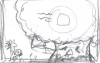 Items: Sort through and select various key items.
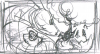 Character Select: Pick a character to see their status, skills.
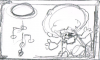 Skills: Shows you the current skills you have unlocked in each characters skill tree.
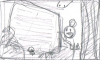 To-Do: Shows you where to go next.
Hope this is the correct forum. Thanks!
In the game I'm working on, I'd like to integrate custom art heavily into the interface through the use of plugins and my own drawings, and I was wondering if this is possible.
If so, how? Here are some examples of images I'm using for different menus. If possible I'd like to add little context sensitive 2 - 3 frame animations to each as well (if possible, once the main bit works). I'm guessing you have to make it so the player can select pieces of an image, but I'm wondering if that's even possible, and if so I have no clue where to even begin to make it happen. Does anyone know?
I'd also like to do little simple cutscenes and such as well, but this is more important at the moment.
Edit: I've done some research myself, but so far I'll I'm seeing is the default menu graphics placed in a different part of the screen, no matter what game it is. A couple games have each of the windows mapped with an overlay, but it doesn't seem to extend beyond those boundaries, and is forced to conform to the standard menu framework. Is there anyway around this (examples?).
Items: Sort through and select various key items. Character Select: Pick a character to see their status, skills.Skills: Shows you the current skills you have unlocked in each characters skill tree. To-Do: Shows you where to go next.Hope this is the correct forum. Thanks!
Last edited: