Indie Dev

Hello Guest!. Register a free account today to become a member! Once signed in, you'll be able to participate on this site by adding your own topics and posts, sell your games, upload content, as well as connect with other members through your own private inbox!

Issues with tiles

Hello!

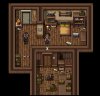
I'm new to RPG Maker and I've been practicing my mapping. I recreated one of the maps in the pop horror city promo images, and I'm struggling to make it work in practice. I want the character to walk down through the door into the lower room. However the wall tiling is blocking the route. I marked it with the "X" in the image below. In the tile settings I can't seem to change the A-tiles to "Passable under the tile."

Does anyone know how to make this work? Sorry if it's something basic that I just haven't figured out yet:(.
Screen Shot 2016-05-04 at 14.04.28.jpg
 

Cunechan

∠( ᐛ 」∠)_
To be honest thats a thingIve been wondering about too. Usually you can always make an event with priorities set as "above player" and use the picture of the ceiling but I'm not sure if it really works. But I've seen it in many games working. Some even make an extra overlay picture just for the ceiling. Hope someone can help you better there :)
 

LTN Games

Master Mind
Resource Team
Xy$
0.01
Unfortunately there is no way to make the wall tile passable and above player on a single tile it will affect the entire map. Those images are very deceiving and I noticed all DLCs they sell, contain Parallax Map screenshots and they're never actually made in the editor.

If you want to make that one part you marked on your map passable and above player, you will need to use a Plugin that adds picture layers and fogs. Or you can add an event to replace the wall and set to above player and passable. You may have to take a screenshot of the wall and add it to your tileset so you can add it to the even graphic.
 

Cunechan

∠( ᐛ 」∠)_
Unfortunately there is no way to make the wall tile passable and above player on a single tile it will affect the entire map. Those images are very deceiving and I noticed all DLCs they sell, contain Parallax Map screenshots and they're never actually made in the editor.
Only if you screenshot it, cut it and put it in the tileset you can use it as event above player ;)

Really didn't expect everyone who does this to do with parallax/overlay. Really thought there was a simple trick for it :/
 
Top