Indie Dev

Hello Guest!. Register a free account today to become a member! Once signed in, you'll be able to participate on this site by adding your own topics and posts, sell your games, upload content, as well as connect with other members through your own private inbox!

Map Lag, how to deal with it

Alaxandir

Villager
Xy$
0.00
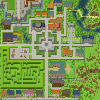
I'm having issues with lag in my project. I've created a central town map which is 100 x 100; and has about 30-40 events in it, but a lot of them are not complex events, just simple npc's with dialogue or doors. I'm kind of surprised that a map as small as 100x100 could lag within this simple engine.. anyone know of optimization tips to help combat this lag?

I have attached an image of the map for reference.
 

Attachments

MinisterJay

Administrator
Staff member
Administrator

Alaxandir

Villager
Xy$
0.00
I don't have a great idea of the back end processing of the engine, does the unused database info actually slow down the performance of a map nonrelated to any of that content?
I'm guessing that if that's been proven to help, rmmv loads all these files into cache instead of keeping it to a load on demand system?
That's pretty bad for performance if the engine is inherently slow.. Wonder why they did it that way... I'm not sure what files I'll use or not use yet so I'm not in a hurry to strip the project.
My smaller maps run just fine.. Any ideas as to what types of events can cause the greatest resource demand?
 

LTN Games

Master Mind
Resource Team
Xy$
0.01
It can be a number of things causing the issue, do you have any plugins enabled? A lighting plugin usually causes the largest performance impact but that was back in the RM Ace days. I really think a parallel event is causing the problem here you should check all of them first. Also the way you structure your events can cause an impact but once again I'm going based on the knowledge from RM Ace. If your event's have a lot of conditionals then this can also be your issue. How much RAM is being used when on this map?

So, I would recommend checking your events first in that specific map, If you want to quickly rule out events, create a map the same size as the one causing issues and don't fill it with any events, give it a play test and see how that effects everything. If that don't do the trick try disabling a few plugins at a time, mainly starting with plugins that have to do with extra windows like a HUD, also check plugins that add pictures as these can easily cause issues if not scripted correctly.
 

Alaxandir

Villager
Xy$
0.00
Let me specify a few things about what I'm calling lag.
My FPS on this map is dipping from 60 to around 52, causing visible stuttering.
The memory use is 10.1MB on the map with or without events. (0.2% CPU usage)

So.. maybe it's a vsync issue or something?
I hate to say im a perfectionist, but that visual stuttering creates a very un-polished and lazy looking game in my opinion.
 

Alaxandir

Villager
Xy$
0.00
This plugin has helped a little bit, the jumps are now within the range I'd call acceptable. I'll re-examine this in the future if I run into any more laggy maps, in the future I think I'll just try to plan the mapping better to keep my maximum size below 100x100.

I appreciate all your assistance in this. @LTN Games
 

LTN Games

Master Mind
Resource Team
Xy$
0.01
No problem, I wish I could be of more help my guess is it has to do with the engine itself and hopefully the next update will fix any current lagging issues you have, at least you can call it "acceptable" now lol. Cheers (smile)
 
Top