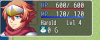
Okay so I been working on my HUD plugin for Sock Quest nd I'm having a small issue with some of my elements getting cut off due to an imaginary padding or something lol. I don't think it has to do with the padding of the main window considering I set it to 5. Anyways here is a screenshot of the issue, I placed my gold element to be drawn a bit beneath the actor name, and as you can see half of it is cut off for some unknown reason. It also affects the face image as well.
Here is my code below, I'm not sure what it has to do with, I'm assuming the main initialize of the window, but I still don't understand why there is such a big gap below. It may be a bit messy, I hope it's not too hard to read, it's more experimental right now, sorry.
Here is my code below, I'm not sure what it has to do with, I'm assuming the main initialize of the window, but I still don't understand why there is such a big gap below. It may be a bit messy, I hope it's not too hard to read, it's more experimental right now, sorry.
JavaScript:
//------------------------------------------------------------------------------
//LTN_SimpleHUD
//------------------------------------------------------------------------------
/*:
* @plugindesc A simple HUD displayed on the map.
*
* @author LTN Games
* @param --Window Settings--
*
* @param HUD BG Image
* @desc Select an image you want as the backgroundd for the HUD.
* @default hudbg
*
* @param HUD BG  Opacity
* @desc Chnage the opacity of the BG Image for the HUD. 0 - 255
* @default 255
*
* @param HUD X Pos
* @desc The X position on screen for the HUD
* @default 0
*
* @param HUD Y Pos
* @desc  The Y position on screen for the HUD
* @default 5
*
* @param HUD Width
* @desc The X position on screen for the HUD
* @default 350
*
* @param HUD Height
* @desc  The Y position on screen for the HUD
* @default 120
*
*/
// -
//===========================================================================
// PARAMETERS
//===========================================================================
(function() {
  var LTN = LTN || {};
  LTN.SimpleHud = LTN.SimpleHud || {};

  LTN.Parameters = PluginManager.parameters('LTN_SimpleHUD');
  LTN.Param = LTN.Param || {};
  LTN.Param.bgFilename   =  String(LTN.Parameters['HUD BG Image']);
  LTN.Param.bgOpacity    =  Number(LTN.Parameters['HUD BG  Opacity']);
  LTN.Param.hudX         =  Number(LTN.Parameters['HUD X Pos']) || 0;
  LTN.Param.hudY         =  Number(LTN.Parameters['HUD Y Pos']) || 0;
  LTN.Param.hudWidth     =  Number(LTN.Parameters['HUD Width']) || 350;
  LTN.Param.hudHeight    =  Number(LTN.Parameters['HUD Height'])|| 200;

  //===========================================================================
  // Scene Map:
  //===========================================================================
  //----------------------------------------------
  // Aliased Nethod:  Create On Map
  //------------------------------------------------------------------------------
  LTN.SimpleHUD_oldMapCreateDisplayObjects = Scene_Map.prototype.createDisplayObjects;
  //------------------------------------------------------------------------------
  Scene_Map.prototype.createDisplayObjects = function() {
    LTN.SimpleHUD_oldMapCreateDisplayObjects.call(this);
    this.createSimpleHUDWindow();
  };

  //----------------------------------------------
  // New Method: Create Simple HUD Window & add as child.
  //----------------------------------------------
  Scene_Map.prototype.createSimpleHUDWindow = function() {
    this._simpleHUDWindow = new Window_SimpleHUD();
    this.addChild(this._simpleHUDWindow);
  };
  //=============================================================================
  // New Window: Window Pop
  //=============================================================================
  function Window_SimpleHUD() {
    this.initialize.apply(this, arguments);
  }

  Window_SimpleHUD.prototype = Object.create(Window_Base.prototype);
  Window_SimpleHUD.prototype.constructor = Window_SimpleHUD;
  //-------=====---------
  //Initialize
  //-------=====---------
  Window_SimpleHUD.prototype.initialize = function(x, y, width, height) {
    var width          = LTN.Param.hudWidth;
    var height         = LTN.Param.hudHeight;
    var px             = LTN.Param.hudX;
    var py             = LTN.Param.hudY;
    Window_Base.prototype.initialize.call(this, px, py, width, height);
    this.opacity = 255;
    this.padding = 5;
    this._actor = $gameParty.members()[0];
    this.refresh();
  };
  //-------=====---------
  //Update -
  //-------=====---------
  Window_SimpleHUD.prototype.update = function() {
    if(this._actor.hp -- || this._actor.hp ++) this.refresh();
    if(this._actor.mp -- || this._actor.mp ++) this.refresh();
  };
  //-------=====---------
  //Refresh
  //-------=====---------
  Window_SimpleHUD.prototype.refresh = function() {
    this.contents.clear();
    this.drawHudElements(this._actor);
  };
  //-------=====---------
  // Draw Actor Name
  //-------=====---------
  Window_SimpleHUD.prototype.drawHudElements = function(actor) {
    if(!LTN.Param.bgFilename) this.drawBgImage();
    this.resetTextColor();
    this.drawActorName(actor, 160, 70, 60);
    this.resetTextColor();
    this.drawActorLevel(actor, 260, 70, 60);
    this.resetTextColor();
    this.drawGold(185, 100, 60);
    this.drawActorHp(actor, 160, 0, 170);
    this.drawActorMp(actor, 160, 35, 170);
    this.loadFace(actor, 0, 0, 144, 144);
  };
  //-------=====---------
  // Draw Actor Face
  //-------=====---------
  Window_SimpleHUD.prototype.loadFace = function(actor, x, y, width, height){
  if(ImageManager.isReady()){
    this.drawActorFace(actor, x, y, width, height);
  }
};
//-------=====---------
// Draw Actor Name
//-------=====---------
Window_SimpleHUD.prototype.drawActorName = function(actor, x, y, width) {
  width = width || 168;
  this.changeTextColor('white');
  this.drawText(actor.name(), x, y, width);
};
//-------=====---------
// Draw Actor Level
//-------=====---------
Window_SimpleHUD.prototype.drawActorLevel = function(actor, x, y, width) {
  width = width || 168;
  this.changeTextColor('white');
  this.drawText('Lvl' + ' ' + actor.level, x, y, width);
};
//-------=====---------
// Draw Gold
//-------=====---------
Window_SimpleHUD.prototype.drawGold = function(x, y, width) {
  var gold         = $gameParty.gold();
  var currencyUnit = TextManager.currencyUnit;
  var gX            = x;
  var gY            = y;
  var gWidth        = width;
  var gIcon         = 208;
  var gString       = gold + ' ' + currencyUnit;
  this.drawIcon(gIcon, x - 32, y);
  this.drawText(gString, gX, gY, gWidth);
};
//-------=====---------
// Draw Actor HP
//-------=====---------
Window_SimpleHUD.prototype.drawActorHp = function(actor, x, y, width){
  width = width || 186;
  var color1 = 'rgba(187, 29, 29, 255)';
  var color2 = 'rgba(164, 25, 62, 255)';
  this.drawGauge(x, y, width, actor.hpRate(), color1, color2);
  this.changeTextColor(this.systemColor());
  this.drawText(TextManager.hpA, x, y, 30);
  this.drawCurrentAndMax(actor.hp, actor.mhp, x, y, width,
    this.hpColor(actor), this.normalColor());
  };
  //-------=====---------
  // Draw Actor MMP
  //-------=====---------
  Window_SimpleHUD.prototype.drawActorMp = function(actor, x, y, width){
    width = width || 186;
    var color1 = 'rgb(14, 22, 212)';
    var color2 = 'rgb(59, 114, 236)';
    this.drawGauge(x, y, width, actor.mpRate(), color1, color2);
    this.changeTextColor(this.systemColor());
    this.drawText(TextManager.mpA, x, y, 30);
    this.drawCurrentAndMax(actor.mp, actor.mmp, x, y, width,
      this.mpColor(actor), this.normalColor());
    };
    //-------=====---------
    // Draw BG Image
    //-------=====---------
    Window_SimpleHUD.prototype.drawBgImage = function() {
      var filename  = LTN.Param.bgFilename;
      var bgOpacity = LTN.Param.bgOpacity;
      this._bgSprite1 = new Sprite(ImageManager.loadPicture(filename));
      this._bgSprite1.opacity = bgOpacity;
      this.addChildToBack(this._bgSprite1);
    };
    //-------=====---------
    // Draw Gauge
    //-------=====---------
    Window_SimpleHUD.prototype.drawGauge = function(x, y, width, rate, color1, color2) {
      var fillW = Math.floor(width * rate);
      var gaugeY = y + this.lineHeight() - 8;
      this.contents.fillRect(x, gaugeY, width, 6, this.gaugeBackColor());
      this.contents.gradientFillRect(x, gaugeY, fillW, 6, color1, color2);
    };
  })();